

CVS Health is a very big company. They have many stores and offices. Because they are so big, they need a special way to manage everyone. This is where CVS Workbrain comes in.
This guide will help you understand everything about Workbrain. We will talk about how to log in. We will look at how to find your paystubs. We will also explain how your schedule works. This guide is made for everyone who works at CVS. It does not matter if you work in a store or a big office.
What exactly is CVS Workbrain?
CVS Workbrain is a computer tool. It helps CVS manage its workers. You can think of it as a digital hub for your work life. It keeps track of when you start work and when you finish. It also helps your manager know who is working each day.
In the past, people used paper to track time. Now, everything is on the computer. This makes it faster and helps prevent mistakes. Workbrain is connected to other tools at CVS, like Colleague Zone and Workday. Even though there are new tools, Workbrain is still very important for tracking your actual hours.
How to use the CVS Workbrain login
To see your information, you must log in. The login page is for all workers. But, how you sign in depends on your job.
Logging in as a Store Worker
If you work in a CVS store or a MinuteClinic, you are a retail worker.
- Go to the official CVS Enterprise Login page.
- Find the box for Retail Store colleagues.
- Type in your 7-digit Employee ID. This is your unique number.
- Type in your password.
Logging in as a Corporate Worker
If you work in a corporate office or for PBM (Pharmacy Benefit Management), your login is different.
- Go to the same login page.
- Find the box for Corporate Retail and PBM colleagues.
- Type in your Windows ID. This is the name you use for your work computer.
- Type in your network password.
Logging in for Health Care Business
Some people work for the Health Care Business (HCB) side of CVS.
- Use the HCB box on the login page.
- Type in your A ID or N ID.
- Type in your password.
How to find your CVS paystubs
Everyone wants to know how much they got paid. Checking your paystub is important. It shows your hours and your taxes.
Using Workbrain for hours
Workbrain shows the hours you worked. You can see your “punches” here. A punch is just when you clock in or out. If you think your pay is wrong, check Workbrain first. It will show if you missed a punch.
Using Colleague Zone for paystubs
In 2025, most people see their actual paystub in a tool called Workday. You get to Workday through Colleague Zone.
- Log in to Colleague Zone using your ID.
- Look for a button that says Pay.
- Click on My Pay.
- You will see a list of dates. Click the date you want to see.
- You can save the paystub as a PDF on your computer.
Paystubs for former workers
If you do not work at CVS anymore, you can still see your paystubs.
- CVS sends you an email after you leave.
- The email has a special link to the Alumni Zone.
- You can log in there for about 30 days.
- If you cannot log in, you must call the HR Service Center at 1-888-694-7287.
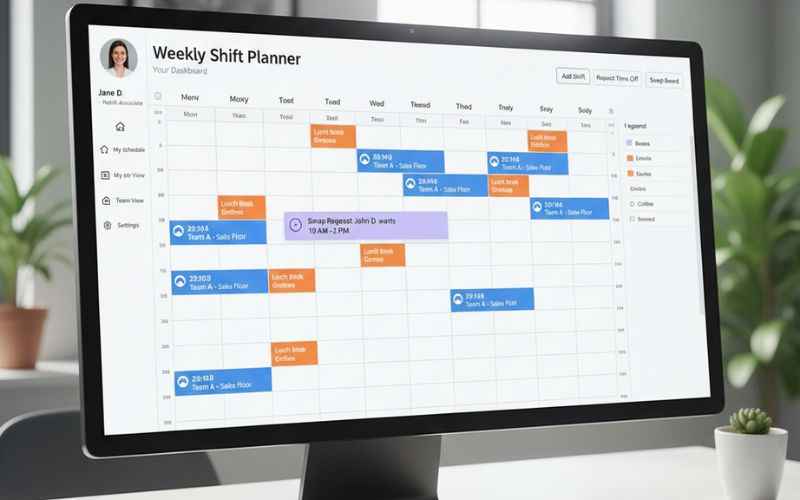
Understanding your schedule in Workbrain
Your manager uses Workbrain to make the schedule. It helps make sure there are enough people in the store.
Checking your shifts
You can see your schedule online. It shows what time you start and what time you go home. It also shows if you have a break. Many workers use a mobile app called ESS to see this quickly. But the data comes from Workbrain.
Swapping shifts
Sometimes you need to change your shift. Workbrain lets you ask to swap with a friend.
- Find the shift you want to change.
- Click on the option to swap.
- Pick the person you want to swap with.
- Your manager must say “yes” before it is official.
Asking for time off
If you want a vacation, you ask in the system.
- Go to the Time Off section.
- Pick the days you want.
- Wait for your manager to check it.
- You will get a message if they approve it.
Troubleshooting login problems
Sometimes the login does not work. This can be frustrating. Here is how to fix it.
If you forgot your password
Do not guess many times. You might get locked out.
- Click the Reset Password link on the login page.
- You will need to answer security questions.
- If that fails, call the IT help desk.
If the page will not load
The Workbrain website can be slow.
- Use a computer, not just a phone.
- Use a browser like Google Chrome.
- Clear your “cache.” This cleans up the browser and helps it load.
Syncing delays
Sometimes you clock in, but it does not show up in Workbrain right away. This is normal. It can take a few hours or even a day to “sync.” If it is still missing after 24 hours, tell your manager.
Why CVS uses Workbrain for labor forecasting
Labor forecasting is a big word. It just means guessing how many workers are needed. Workbrain looks at how busy the store was last year. It then tells the manager how many people to schedule. This helps the store save money and keeps customers happy.
Frequently Asked Questions
Can I access CVS Workbrain from home?
Yes, you can check your schedule and hours from a personal computer or phone. Use the CVS Enterprise Login website. It is best to use the Google Chrome browser for the fewest errors. Make sure you have your 7-digit ID or Windows ID ready before you start.
Why can I not see my paystub in Workbrain?
Workbrain is mostly for tracking your work hours and punches. CVS has moved final pay records to Workday. To see your actual paystub, you should log in to Colleague Zone. Once you are there, look for the “Pay” section. This is where your official tax and money documents are kept.
What do I do if I forget my CVS login password?
If you cannot remember your password, do not keep trying. You might get locked out of the system. Go to the login page and click the link that says “Reset Password.” You will need to answer some security questions to prove who you are. If you are still stuck, call the IT help desk at 1-855-280-4872.
How do former employees get their paystubs?
If you no longer work at CVS, you can use the CVS Alumni Zone. CVS usually sends an email to your personal address about 24 to 48 hours after your last day. This email has your special login name and a temporary password. You can use this to download your past paystubs and W-2 forms for about 30 days.
Why are my hours from today not showing up yet?
The Workbrain system is not always “live.” It often takes about 24 hours for the punches you make at the store to show up on your online account. If you worked today and do not see it, check again tomorrow. If the hours are still missing after two days, you should talk to your store manager.
Is there a mobile app for CVS Workbrain?
There is no app specifically named “Workbrain” for your phone. Most workers use the ESS (Employee Self-Service) app or the Workday app to manage their work life. You can also just use the web browser on your phone to visit the login website.
How can I get my W-2 form for taxes?
Your W-2 form is kept in Workday. You can find it by logging into Colleague Zone. These forms are usually ready by the end of January. If you are a former worker, CVS will mail a paper copy to the home address they have on file. You can also find it on the ePrintview website using the employer code VSY2.
Summary of key points
- Workbrain tracks your time and punches.
- Colleague Zone and Workday show your paystubs.
- Store workers use a 7-digit ID to log in.
- Corporate workers use a Windows ID.
- If you have a problem, the HR Service Center can help.
Checking your information often is a good habit. It makes sure you get paid for every minute you work. It also helps you plan your life around your schedule.
Disclaimer: This content is for general information only. It is not affiliated with CVS Health. Login steps, tools, and policies may change at any time. Always use official CVS systems and contact CVS HR or IT for account, payroll, or access issues.
You May Also Like: Send Parcel to Australia: Your Go-To Checklist for Sending a Parcel to Australia
For More Information, visit TryHardGuides.

Alex Taylor is a seasoned technology writer and systems specialist with over 5 years of experience in hardware maintenance and digital troubleshooting. He specializes in practical tech guides, focusing on making complex technical repairs and software optimization accessible to everyday users. Alex personally reviews and fact-checks every guide to ensure that maintenance tips are safe, effective, and budget-friendly. Whether it’s a hardware fix or a software setup, his work is driven by a passion for technical clarity and real-world utility.