

It is very hard to edit a video or a podcast when you have to look at sound waves for hours. You might feel tired of listening to the same clip over and over just to find one small mistake. This “manual grind” makes creative work feel like a chore, but using a tool like Dialogger can change that. You want to focus on the story, but the tech often keeps getting in your way.
Many people also struggle with making sense of long meetings or group chats. You might walk away from a talk and realize you have no idea who spoke the most or if the main point was actually met. It feels like a waste of time when you cannot see the “shape” of a conversation. You need a way to turn those voices into clear data, and Dialogger provides the exact solution you need to make sense of it all.
If you are a game maker, you know the pain of messy dialogue trees. Linking one choice to another in a giant spreadsheet is a nightmare. One wrong link can break the whole game, and finding that bug is like looking for a needle in a hay bale. You feel frustrated because you want to write great stories, not manage broken files. These three struggles are exactly what a tool like Dialogger is built to fix.
What is Dialogger and How Does It Work
Dialogger is not just one single thing. It is a name used for a few special tools that help you work with speech and text. At its heart, it takes the spoken word and turns it into something you can see, move, and change. Instead of just hearing sound, you get to work with a map of that sound.
Some versions of this tool act as a bridge between video editing and text editing. Others work as a brain for video games to help characters talk to you. There is even a version that works on your phone to track how people talk in a room. No matter which one you use, the goal is to save you time and stop the “guessing game” of manual work.
Editing Video and Audio Using Text
The most famous version of this tool comes from the world of professional media. If you have ever tried to edit a long interview, you know how slow it is. You have to scrub through a timeline to find the right quote. It is slow and often leads to mistakes.
This version of the tool changes that by using speech-to-text tech. It creates a written transcript of everything said in your file. When you want to cut a piece of the video, you do not touch the video clip. Instead, you just highlight the text and delete it. The tool then automatically cuts the video to match your text edit.
This way of working is much faster. It lets you “read” your video like a book. You can search for a specific word, find the exact moment it was said, and move it to a different spot. It takes the stress out of editing and lets you focus on the message instead of the technical knobs.
Making Better Games with Visual Dialogue Trees
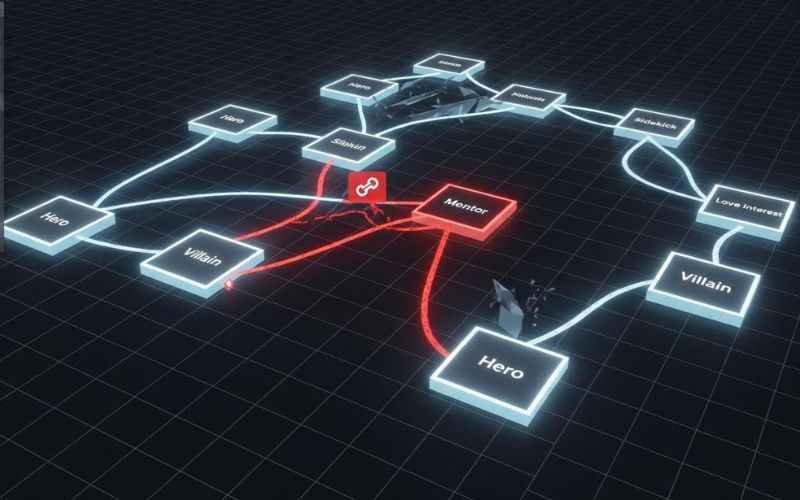
For those who make video games, a different kind of Dialogger is a lifesaver. Games today are full of choices. When a player talks to a character, they might have four different things to say. Each of those leads to a new part of the story. Keeping track of these “branches” is very hard to do in your head.
The visual version of this tool uses a “node” system. Imagine a bunch of boxes on your screen connected by lines. Each box is a piece of dialogue. You can drag and drop these boxes to change the flow of the story. This makes it very easy to see the whole narrative at once.
Using a visual map stops you from making logic mistakes. You can see if a conversation hits a “dead end” or if a player gets stuck in a loop. It also lets you add special rules. For example, a character might only say something if the player has a certain item. Managing these complex rules becomes simple when you can see them right in front of you.
Tracking Conversations on Your Phone
Sometimes you just want to know how a meeting went. There is a mobile version of this tool designed for exactly that. It does not just record what people say; it analyzes how they say it. This is great for teachers, bosses, or even friends who want to understand their group habits.
When you use the app during a talk, it creates graphs. These graphs show you a “talk ratio.” You can see if one person talked for 80% of the time while everyone else stayed quiet. This data helps you make sure everyone gets a turn to speak in the future.
It also helps with “sentiment.” This is a fancy word for the mood of the talk. The tool can tell if a conversation was happy, tense, or calm. Seeing this on a screen gives you a new way to look at your daily life. It takes the “gut feeling” out of a meeting and replaces it with real facts.
Choosing the Best Dialogger Version for Your Needs
Since there are a few tools with this name, you need to pick the right one. If you are a creator who makes YouTube videos or podcasts, look for the text-based editing tool. It will cut your editing time in half and make your workflow much smoother.
If you are a developer building a world, the visual node-based editor is your best friend. It will keep your story organized and stop your game from breaking. You can focus on the art of writing while the tool handles the messy links.
Finally, if you just want to improve your meetings or social skills, the mobile app is the way to go. It gives you the data you need to listen better and lead more balanced talks. Each version of Dialogger is built to solve a specific problem, so think about where your biggest “headache” is right now.
How to Get Started with Text Editing at Dialogger
To start using the text-based version, you first need a clear recording. The tool works best when the sound is crisp. Background noise can make the text part messy, so try to record in a quiet room. Once you have your file, you upload it and let the system create the script.
Once the script is ready, treat it like a Word document. Read through it and look for “filler words” like “um” or “ah.” You can delete these in the text, and they will vanish from the audio too. It feels like magic the first time you do it.
After you finish your edits, you can export a file called an “EDL.” This is a list that other big editing programs can read. This means you can do the fast work in Dialogger and then move to a more powerful program for the final polish. It is the best of both worlds.
Managing Complex Game Stories
When setting up a dialogue tree, start small. Create a “start node” where the character says hello. Then, create two or three “choice nodes” for the player. Connect them with lines to see how the flow feels.
As your story grows, use colors or groups to keep things neat. Most visual editors let you label different parts of the talk. This is helpful when you come back to the project after a few days. You won’t have to spend an hour remembering where you left off.
The best part about these tools is the “export” feature. They usually save your work as a JSON or XML file. These are formats that game engines like Unity or Godot love. It means you don’t have to write any code to get your story into your game. The tool does the heavy lifting for you.

Using Data to Improve Your Meetings
Using the mobile app is very simple. You just place your phone in the middle of the table and hit record. The app uses the microphone to tell different voices apart. It doesn’t need to know who is who; it just needs to know that “Voice A” and “Voice B” are different.
After the talk, look at the “Silence vs. Speech” chart. A healthy talk usually has a good balance of both. If there is no silence, it might mean people are talking over each other. If there is too much silence, it might mean the group is stuck.
Use these insights to change how you talk next time. If you see that you talk too much, try to ask more questions. If you see that someone else is quiet, try to invite them into the conversation. It is a great way to grow and become a better communicator.
Common Questions About Conversation Tools
Is Dialogger hard to learn?
The answer is no. These tools are designed to make things easier, not harder. Most people can learn the basics in about ten minutes. They use simple buttons and clear menus so you don’t get lost.
Is my data and privacy safe?
When you record speech, you want to know it is safe. Most versions of these tools keep your data on your own computer or phone. They do not send your private talks to a big cloud unless you ask them to. Always check the settings to make sure you are comfortable.
Is the speech-to-text 100% right?
No system is perfect. Sometimes it might misspell a name or a rare word. But even if it is only 95% right, it still saves you a massive amount of time. You can quickly fix a few words much faster than typing the whole thing from scratch.
Final Thoughts on Solving Your Speech Workflows
Working with voices and conversations does not have to be a struggle. Whether you are cutting a video, building a game, or leading a team, there is a tool that can help. Dialogger represents a new way of thinking about speech. It turns sound into a visual map that you can control.
By moving away from old, manual ways of working, you free up your mind for more important things. You can be more creative and less stressed. You can have better talks and tell better stories. The tools are here to help you get over the “manual grind” and start seeing the big picture.
The next time you feel frustrated with a long audio file or a messy script, remember that there is a better way. Taking the time to use a smart tool now will save you hundreds of hours in the long run. It is the best move for your productivity and your peace of mind.
Disclaimer: The information provided in this article is for general informational and educational purposes only. While we strive to provide accurate and up-to-date insights into the various tools known as “Dialogger,” software features and terms of service can change frequently. We do not provide technical warranties for any third-party open-source tools or mobile applications mentioned. Users should review the specific documentation and privacy policies of each tool before installation. All product names, logos, and brands are the property of their respective owners.
You May Also Like: Why the Origin of Dyeowokopizz Is the Mystery Everyone Is Talking About
For More Information, visit TryHardGuides.

Alex Taylor is a seasoned technology writer and systems specialist with over 5 years of experience in hardware maintenance and digital troubleshooting. He specializes in practical tech guides, focusing on making complex technical repairs and software optimization accessible to everyday users. Alex personally reviews and fact-checks every guide to ensure that maintenance tips are safe, effective, and budget-friendly. Whether it’s a hardware fix or a software setup, his work is driven by a passion for technical clarity and real-world utility.